Evaluating the Photoshop Coffee Gradients Pack GRD for Design Projects
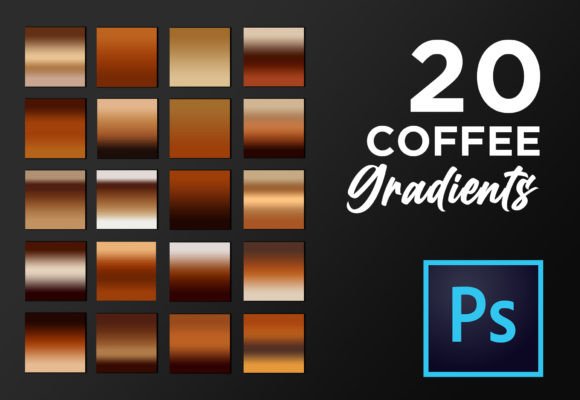
For graphic designers, photo editors, and digital artists, the selection of color palettes and tonal transitions is often the defining factor in a project's visual success. When searching for colorful gradients to enhance Photoshop workflows, professionals frequently encounter the Photoshop Coffee Gradients Pack GRD. This collection consists of 20 elegant gradient add-ons specifically engineered for digital use within Adobe Photoshop. Rather than serving as a mere aesthetic addition, this pack functions as a functional toolset designed to streamline the creation of unique looks for photos, design elements, text effects, and background imagery.
The primary value proposition of the Photoshop Coffee Gradients Pack GRD lies in its ability to simplify complex color grading tasks. In professional environments, achieving a cohesive "coffee" tone—ranging from deep espresso browns to creamy latte beiges and warm caramel highlights—can require significant manual adjustment of curves and levels. These presets offer a pre-calibrated solution, allowing users to apply a sophisticated tonal range with a single click. This efficiency is particularly valuable when working on tight deadlines or when consistency across multiple assets is required.
Core Features and Technical Specifications
Understanding the technical composition of this asset pack is essential for determining its compatibility with your current workflow. The package is delivered as a standard .GRD file, which is the native format for gradient presets in Adobe Photoshop. This ensures seamless integration without the need for third-party plugins or converters. Upon downloading, users receive the core gradient file alongside supplementary educational materials designed to maximize the utility of the tools.
The inclusion of documentation sets this pack apart from many generic free resources. It contains a comprehensive guide on how to use the gradients, available in both English and German, catering to a broader international user base. Furthermore, the pack includes a list of 15 valuable tips specifically curated for working with Photoshop gradients. Perhaps most significantly for intermediate users, a PDF file explaining all blend modes is included, also in English and German. Understanding blend modes is critical for applying gradients effectively, as it dictates how the gradient interacts with the underlying image data whether through multiplication, screening, or overlaying.
Practical Applications and Use Cases
The versatility of the Photoshop Coffee Gradients Pack GRD allows it to serve various industries and project types. Its application extends far beyond simple photo filtering. For instance, in graphic design, these gradients can be utilized to create cool text effects that mimic the depth and richness of roasted coffee beans, adding a tactile quality to typography. In web design, they function effectively as subtle background images that provide warmth without overwhelming foreground content.
Print media represents another strong fit for these assets. Designers creating flyers, posters, banners, and business cards often require a specific mood that earth tones convey naturally. The "coffee" palette suggests reliability, warmth, and organic quality, making it an excellent choice for branding materials related to cafes, bakeries, organic products, or autumn-themed campaigns. Additionally, the gradients are suitable for book covers and greeting cards, where atmospheric depth is necessary to draw the viewer's eye. For those involved in print-on-demand services, these presets can rapidly generate variations of artwork for merchandise such as mugs or t-shirts.
In the realm of photo editing, the pack enables users to give photos a unique look instantly. Whether correcting white balance issues in indoor photography or stylizing portraiture with a warm, vintage aesthetic, a single gradient from the set can alter the entire emotional resonance of an image. This capability makes it a potent tool for social media managers and content creators who need to maintain a consistent visual identity across platforms.
Benefits and Workflow Efficiency
The most significant benefit of adopting this gradient set is the reduction in production time. Manually crafting a smooth, multi-stop gradient that balances shadow, midtone, and highlight colors requires a keen eye and experimentation. By utilizing pre-designed presets, designers can bypass the trial-and-error phase. The claim that "all it takes is one gradient from the set to create whole wonders" underscores the transformative potential of well-engineered presets. They allow the designer to focus on composition and layout rather than getting bogged down in color theory adjustments.
Moreover, the educational components included in the pack address a common pain point: the underutilization of tools due to a lack of knowledge. Many users possess gradient files but fail to achieve professional results because they do not understand how to manipulate opacity or blend modes. The included guides on blend modes and usage tips bridge this knowledge gap, empowering users to customize the gradients rather than just applying them blindly. This transforms the product from a static asset into a learning opportunity.
Considerations and Limitations
While the Photoshop Coffee Gradients Pack GRD offers substantial value, it is important to evaluate its limitations relative to specific needs. First and foremost, these gradients are explicitly suitable for Adobe Photoshop. Users relying on alternative software such as GIMP, Affinity Photo, or Canva may find the .GRD format incompatible without conversion workarounds, which can sometimes result in a loss of fidelity or color accuracy.
Additionally, the aesthetic scope is defined by the "coffee" theme. While the pack includes 20 elegant variations, they all revolve around a specific color spectrum of browns, tans, creams, and warm neutrals. For projects requiring vibrant, neon, or cool-toned palettes (such as blues and cyans), this pack will not suffice as a standalone solution. It is best viewed as a specialized tool for warm-tone projects rather than a universal color library. Designers working on futuristic, high-tech, or children's themes may find the earthy palette too restrictive.
There is also the consideration of originality. Because these are preset assets, there is a risk that other designers using the same pack may produce similar-looking results. To mitigate this, users should leverage the included tips to modify the gradients—adjusting scale, angle, and blend mode—to create a bespoke variation that aligns uniquely with their brand identity.
Installation and Implementation
Implementing these tools into your workflow is a straightforward process, designed to be accessible even for beginners. The installation procedure generally follows these steps:
- Unzip the file: After downloading the package, extract the contents using any standard decompression tool.
- Load the Gradient: Locate the .GRD file within the extracted folder. In most versions of Photoshop, double-clicking the file will automatically import the gradients into the software. Alternatively, users can open the Gradient Editor in Photoshop and select "Import" to load the file manually.
- Apply and Adjust: Select the Gradient Tool, choose one of the new coffee presets from the list, and apply it to your layer. Experiment with the blend modes explained in the included PDF to see how the gradient interacts with your specific image.
Making the Decision
Deciding whether to integrate the Photoshop Coffee Gradients Pack GRD into your toolkit depends largely on your current project requirements and skill level. If you frequently work on projects that benefit from warm, organic, or vintage aesthetics, this pack provides a high return on investment regarding time saved and quality achieved. It is particularly recommended for freelancers managing diverse client portfolios who need to switch between styles rapidly.
However, if your work primarily involves cold-color palettes or if you are already an expert in manual color grading who prefers building every effect from scratch, the utility of this pack may be diminished. Furthermore, non-Photoshop users should verify compatibility before acquisition.
Ultimately, the combination of high-quality .GRD files and detailed instructional material makes this a robust resource for enhancing digital art. By providing both the tools and the knowledge to use them effectively, the pack supports the creation of gorgeous projects while fostering a deeper understanding of Photoshop's gradient capabilities. For those looking to elevate their design elements with minimal effort and maximum elegance, this collection represents a practical and efficient solution.